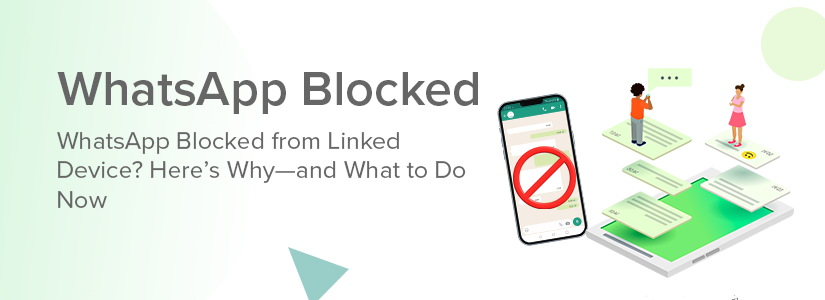
WhatsApp Blocked from Linked Device? Here’s Why—and What to Do Now

It started with a few confused calls. Then a flood.
“I can’t connect to WhatsApp archiving anymore.”
“My account won’t let me use web.whatsapp.com.”
“We’ve been blocked for months. Are we even compliant right now?”
If you’re reading this, there’s a good chance your WhatsApp archiving stopped working sometime around September 2025. You tried reconnecting. Nothing. You contacted support. They said Meta blocked your account. And now you’re stuck—unable to archive WhatsApp messages while your clients keep messaging you on the platform.
So what actually happened? Why did Meta block thousands of accounts? And most importantly—what should you do if you’re still affected?
Let’s break it down.
What Happened: Why WhatsApp Accounts Got Blocked from Linked Device Sessions
The short version? Telemessage (acquired by Smarsh in 2024) was flagged by Meta for violating WhatsApp’s Terms of Service. When that happened, Meta didn’t just disconnect the service—they blocked the actual WhatsApp accounts from creating any linked device sessions.
That meant if you were using Telemessage’s WhatsApp Cloud Archiver, you weren’t just cut off from archiving. You were prevented from connecting to any archiving solution that requires a linked device—which is basically all of them.
Here’s the timeline:
Early 2025: Security Breach and TOS Violations
Telemessage suffered a security breach. When people started digging through their GitHub code, they found something concerning: The way Telemessage captured ephemeral message platforms appeared to violate WhatsApp’s TOS.
Meta took notice and officially listed Telemessage as an “unofficial app.” That’s tech-speak for: this isn’t authorized, and we don’t support it.
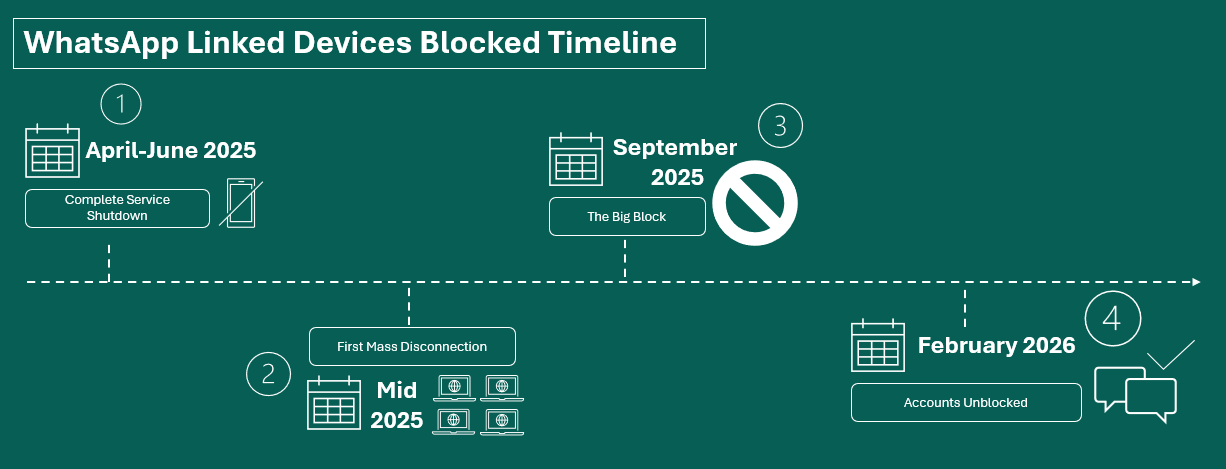
April–June 2025: Complete Service Shutdown
Smarsh shut down all Telemessage archiving services for roughly two months. No archiving. No messages captured. For regulated firms, this created immediate
compliance gaps under FINRA and SEC recordkeeping rules.
Mid-2025: First Mass Disconnection
Services came back online, but it didn’t last. Within weeks, Meta disconnected everyone using WhatsApp Cloud Archiver again. The problem? Geographic inconsistencies. Phones located overseas were linking to U.S.-based servers—a red flag for Meta.
Telemessage allegedly deployed a workaround using geo-proxying to mask server locations. Users were able to reconnect. Things seemed okay.
Until they weren’t.
September 17, 2025: The Big Block
On or around September 17, 2025, nearly every WhatsApp Cloud Archiver user was disconnected again. But this time was different.
Meta didn’t just disconnect the archiving sessions. They blocked the WhatsApp accounts themselves from creating any linked device sessions at all. When users tried to connect to web.whatsapp.com, they couldn’t. The accounts were flagged.
This block lasted five months. From September 2025 through early February 2026, affected users had no way to archive WhatsApp messages—and no way to migrate to a different solution because migration also requires linked device capability.
Organizations were stuck.
February 4, 2026: Accounts Unblocked
As of February 4, 2026, Meta lifted the restrictions. Most blocked accounts can now connect to web.whatsapp.com again and establish linked device sessions.
But that doesn’t mean everything’s back to normal.
Why Being Blocked from WhatsApp Matters for Compliance
If you work in a regulated industry—financial services, healthcare, government—you already know that mobile message archiving isn’t optional. It’s required.
But here’s what made this situation particularly painful: clients want to use WhatsApp. It’s convenient, it’s encrypted, and it’s where they’re already communicating. Telling them “we can’t use WhatsApp anymore because our archiving broke” isn’t exactly a conversation anyone wants to have. The risk goes beyond disruption. If WhatsApp detects repeated violations, accounts can be blocked or permanently restricted, forcing organizations to change phone numbers, create new WhatsApp accounts, and rebuild trusted communication channels from scratch.
Meanwhile, regulators don’t care why you have compliance gaps. They just care that you have them.
So when your WhatsApp archiving went dark for five months, you were left with two bad options:
1. Keep using WhatsApp without archiving (and violate recordkeeping requirements)
2. Tell clients they can’t message you on WhatsApp anymore (and risk losing business)
Neither is a good look.
And if you tried to migrate to a different WhatsApp compliance solution during that time, you were largely blocked. Most compliant WhatsApp compliance solutions require an active account connected through a linked device session—something that isn’t possible if Meta has restricted the account.
Workarounds existed, but they were disruptive: register a new phone number and WhatsApp account to re-enable linked devices, or switch to a WhatsApp API–based compliance solution with a more limited feature set than native WhatsApp.
What You Need to Know Right Now
Even though the block has been lifted, that doesn’t mean the risk is gone. Here’s what you should be thinking about:
1. Test Your Accounts Immediately
Log in to web.whatsapp.com with each affected account. Can you connect? Can you create a linked device session? If yes, great—that means migration is technically possible now.
If no? You’re still blocked, and you need to address that before you can move forward.
2. Document Your Compliance Gaps
Pull your archiving logs and identify exactly when messages stopped being captured. September through January? That’s a five-month gap in your records.
Work with your compliance team to understand what that means for your organization. Some firms have been required to file reports with regulators. Others have had to implement remediation plans. Don’t wait until an audit to figure this out.
3. Understand the Pattern of Disruptions
This wasn’t a one-time glitch. Let’s count:
- A security breach
- TOS violations flagged by Meta
- Two-month service shutdown
- First mass disconnection
- Five-month account blocks
That’s not a technology hiccup. That’s a structural problem.
Even if things are working today, do you feel confident they’ll stay working six months from now?
4. Know That Migration Is Now Possible (But May Not Be Forever)
For five months, migration was technically impossible. You couldn’t switch to a different archiving platform even if you wanted to, because your accounts couldn’t establish the linked device sessions required for setup.
Now that the blocks are lifted, you have that capability back. But there’s no guarantee it’ll last. If Meta decides to impose new restrictions—or if there’s another TOS violation—you could be locked out again.
Which means if you’ve been thinking about switching, now is the time to act while you still can.
What to Do If You Were Affected
If your organization was impacted by these disruptions, here’s what we recommend:
Step 1: Verify Account Status
Test whether your WhatsApp accounts can now successfully connect to web.whatsapp.com and create linked device sessions. This confirms you have the technical ability to set up a new archiving solution.
Step 2: Review Your Compliance Exposure
Map out exactly when archiving was down and what messages went uncaptured. If you’re in financial services, this is especially critical—FINRA and SEC rules don’t make exceptions for vendor problems.
Step 3: Evaluate Alternative Solutions
Look for archiving platforms that:
- Haven’t been flagged by Meta for TOS violations
- Use approved methods for message capture
- Have a proven track record of reliability
- Support other communication channels (email, SMS/text, social media) in a single platform
Migration doesn’t have to be complicated, but it does require planning. The right solution will work with your IT and compliance teams to ensure continuous message capture throughout the transition.
Step 4: Consider the Risk of Waiting
Right now, your accounts work. But given the pattern of disruptions over the past year, it’s fair to ask how long that will last.
There is real risk in reconnecting to TeleMessage. In 2025 alone, Meta blocked access twice. If that pattern is any indication, a third enforcement action could be more severe—or even permanent.
Organizations that attempted to migrate during the September–January block period couldn’t. They were stuck. If another block occurs—and there’s little reason to assume it won’t—you could be locked out again.
The window for migration is open now. It may not stay open.
Questions to Ask Your Current Provider (or Any New One)
Before you make any decisions, get clear answers:
Has your platform been flagged by Meta for TOS violations?
If yes, what steps have been taken to resolve it? If no, what methods do you use to ensure compliance with Meta’s requirements?
What’s your uptime track record?
Ask for documentation. Two-month shutdowns and five-month blocks aren’t normal. You deserve better.
How do you handle service disruptions?
What’s the contingency plan if archiving goes down? How are clients notified? What remediation support do you provide?
Can you support migration without downtime?
Good providers should be able to set up your new system while your old one is still running (if it’s running), ensuring no gaps in message capture.
Do you archive other channels in the same platform?
If you need to search across WhatsApp, email, and SMS for an audit or legal hold, having everything in one system makes life a lot easier. Learn more about all-in-one archiving solutions.
Need Help Migrating? We Can Help.
If you’re affected by these issues—or just want to make sure it doesn’t happen to you—we’re here to help.
Intradyn specializes in enterprise-grade mobile archiving for organizations in regulated industries. Our WhatsApp archiving solution hasn’t been flagged by Meta, uses approved capture methods, and integrates with email, SMS, and social media archiving in a single platform.
We’ve helped organizations migrate from Telemessage and other platforms experiencing disruptions. We understand the compliance stakes, the technical requirements, and how to make the transition as smooth as possible.
We offer a free migration assessment where we:
- Review your current situation and archiving needs
- Explain your options (honestly—even if it means sticking with what you have)
- Map out a migration plan that minimizes disruption and maintains compliance
No hard sell. Just straight talk from people who’ve been doing this for over 15 years.
Contact us for a free WhatsApp archiving migration assessment.
The accounts are unblocked. The window for migration is open. Whether you move now or stay put, at least you’ll know what you’re dealing with—and what your options are if things go sideways again.
Because in compliance, being prepared beats being stuck every single time.