Microsoft Purview eDiscovery in Practice: Limits, Throttling, Exports, and an Operational Playbook


In production environments, however, eDiscovery success is determined less by what features exist and more by how the platform behaves under real conditions—large data volumes, concurrent investigations, tight legal timelines, and regulatory scrutiny. This is where expectations and reality begin to diverge.
Where eDiscovery Meets Reality
Microsoft Purview eDiscovery is often evaluated by its feature set: cases, searches, review sets, analytics, and exports. On paper, the platform looks comprehensive and well-integrated with Microsoft 365. In controlled demos and small matters, that impression generally holds.
This blog is written for technical users—IT administrators, compliance engineers, and legal operations teams—who already understand the fundamentals of Purview eDiscovery. The goal here is not to explain what Purview does, but how it behaves: where its architectural limits surface, how those limits affect day-to-day operations, and how experienced teams adapt their workflows to remain effective.
(For a feature-level overview of how Purview eDiscovery works, see our earlier post on Microsoft Purview eDiscovery fundamentals.)

Understanding the Purview eDiscovery Architecture (Why Limits Exist)
Purview eDiscovery is not a standalone discovery system. It is a service layer that orchestrates discovery workflows across Microsoft 365 workloads such as Exchange Online, SharePoint Online, OneDrive, Teams, and the Microsoft Graph. Searches, indexing, analytics, and exports all depend on the availability and performance of those underlying services.
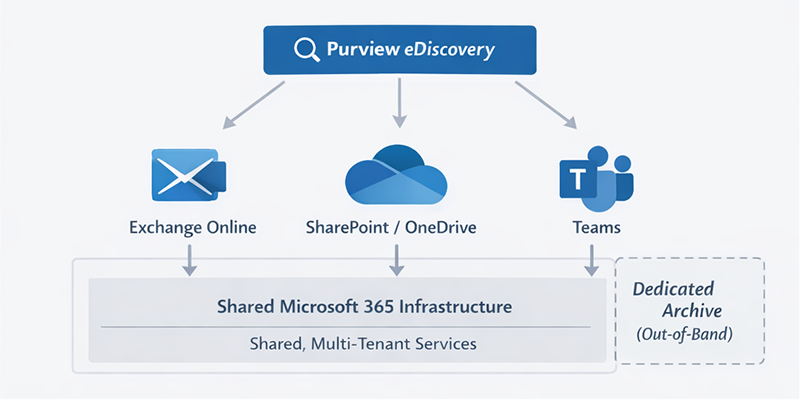
From an architectural standpoint, this means two important things. First, Purview inherits the service protection limits, throttling policies, and performance characteristics of the workloads it sits on top of. Second, it operates in a shared, multi-tenant environment where discovery activity competes with normal business usage like email traffic, file access, and collaboration workloads.
Unlike a dedicated archive or discovery platform, Purview does not provide tenants with isolated indexing pipelines or guaranteed export throughput. Capacity is elastic and shared, which keeps the service scalable at Microsoft’s scale—but also introduces variability. Many of the operational challenges teams encounter are not misconfigurations; they are direct consequences of this design.
Case-Centric Design and Its Operational Impact
Purview eDiscovery enforces a case-centric workflow. Every advanced discovery activity—searches, review sets, analytics, and exports—must be associated with a case. From a legal and governance perspective, this structure makes sense. It creates clear boundaries, auditability, and defensibility.
Operationally, however, the case model introduces friction, especially for technical teams supporting iterative investigations. Searches are scoped to cases, and results must be explicitly added. Critically, Purview treats each search independently. If the same item appears in multiple searches, it can be added to the case multiple times. There is no automatic cross-search deduplication.
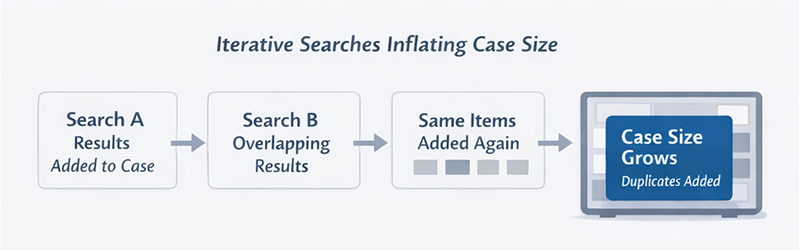
In real investigations, search criteria are rarely perfect on the first attempt. Teams refine keywords, adjust date ranges, and expand custodian lists as new information emerges. In Purview, each refinement risks inflating the case with duplicate content unless scope is actively managed. Over time, cases can grow far larger than intended, affecting review performance, analytics processing, and export reliability.
This is one of the earliest points where operational discipline begins to matter more than feature availability.
Search Performance and Indexing Realities
Purview search performance is inseparable from Microsoft 365 indexing behavior. Searches are only as complete and as fast as the underlying indexes allow. Exchange, SharePoint, and OneDrive each have different indexing pipelines and latency characteristics, and those differences show up directly in discovery results.
Index freshness is a common issue. Newly ingested or modified content may not be immediately searchable, which can create gaps during time-sensitive investigations. Certain file types, attachments, or message artifacts may be indexed inconsistently, depending on workload and configuration. Large, unbounded searches—wide date ranges, broad keyword sets, or many custodians—tend to execute slowly and fail more often.
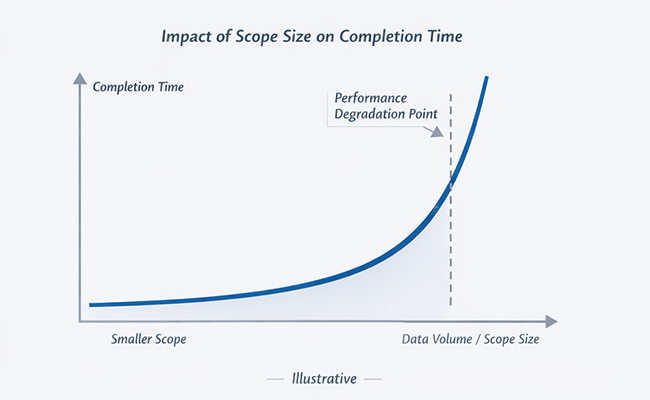
As data volumes increase, the effectiveness of “one big search” approaches drop sharply. Experienced administrators adapt by segmenting searches into smaller, more targeted queries. While this increases administrative overhead, it improves reliability, reduces failure rates, and makes validation possible when results are questioned.
Export Limits: The Most Common Operational Bottleneck
Exports are where many organizations experience the sharpest disconnect between expectations and reality.
Microsoft enforces tenant-level export limits that are commonly cited at roughly two terabytes per day, regardless of how many cases or exports are running. This limit applies across the tenant, not per case. Even when exports fall below documented thresholds, they remain subject to throttling based on overall service load and backend availability.
From an operational standpoint, this introduces uncertainty. Exports may progress smoothly one day and stall the next with no change in configuration. Long-running exports can pause, restart, or require reauthorization. For teams working under court-ordered or regulatory deadlines, this unpredictability becomes a material risk rather than a minor inconvenience.
It is also important to understand that Purview exports are optimized for Microsoft-centric workflows. They are functional, but they are not designed for sustained, high-volume, repeat productions across multiple matters. Organizations that attempt to use Purview as a production engine at scale often find themselves managing around these constraints rather than eliminating them.
Throttling: Not a Bug, but Still a Problem
From Microsoft’s perspective, throttling is a protective mechanism. Purview eDiscovery runs on shared Microsoft 365 infrastructure, and throttling exists to prevent any single tenant or workload from degrading overall service availability. In that sense, throttling is functioning exactly as designed.
For eDiscovery teams, however, intent matters far less than impact. Throttling manifests as slower searches, exports that pause or crawl unpredictably, and analytics jobs that take significantly longer than expected. What makes this particularly challenging is that throttling is not deterministic. Two exports of similar size may behave very differently depending on time of day, concurrent tenant activity, or transient backend conditions.
Administrators have no visibility into when throttling will occur or how aggressively it will be applied. There is no mechanism to reserve throughput for a critical case, no way to prioritize one investigation over another, and no service-level guarantee around export completion times. As a result, teams are forced to plan defensively—assuming delays, building buffers into timelines, and communicating uncertainty to legal stakeholders who are often expecting precision.
Over time, throttling changes how Purview is used. Instead of being a responsive discovery engine, it becomes a system that must be carefully scheduled and managed, particularly in environments with frequent or overlapping matters.
Review Sets and Analytics at Scale
Purview eDiscovery Premium offers advanced analytics capabilities that are genuinely useful in early-stage investigation and review. Email threading, near-duplicate detection, and relevance scoring can significantly reduce reviewer workload when applied to reasonably sized datasets.
At scale, however, these features introduce trade-offs. Analytics processing is computationally expensive, and as review sets grow, processing time increases non-linearly. What might take hours on a small dataset can take days on a large one. During this time, review sets may be partially unavailable or feel sluggish, which directly affects reviewer productivity.
User interface performance is another factor. As review sets accumulate millions of items, navigation, filtering, and tagging can become inconsistent. Reviewers experience lag, timeouts, or delayed updates, which increases frustration and error rates. These issues are rarely catastrophic, but they are persistent enough to influence workflow decisions.
In response, many teams pre-filter aggressively before data ever reaches a review set. Others treat Purview analytics as a triage mechanism—useful for narrowing scope—but not as the final review environment. Data is often exported to specialized review platforms once initial culling is complete. While effective, this approach adds steps, handoffs, and additional points of failure.
Legal Holds: Coverage vs. Operational Cost
Legal holds are one of Purview’s strongest features from a defensibility standpoint. Broad holds ensure that potentially relevant data is preserved, even if the scope of an investigation changes over time. For legal teams, this provides confidence that data loss risk is minimized.
Operationally, broad holds come with costs that are not always obvious at the outset. Tenant-wide or near-tenant-wide holds increase storage consumption and expands the volume of data that must be indexed and searched. Over time, this impacts baseline system performance and increases the workload Purview must manage for every subsequent case.
Holds also reduce flexibility. Modifying or releasing them—particularly in environments with layered or overlapping matters—requires careful coordination. Because mistakes carry real risk, changes tend to be conservative and slow. From a technical perspective, holds are effective but blunt instruments: they prioritize completeness over efficiency and precision.
How Teams Actually Succeed with Purview
Teams that succeed with Purview eDiscovery do not attempt to eliminate its constraints. Instead, they design workflows that account for them.
They segment investigations into smaller, controlled units rather than running monolithic searches and exports. They schedule large exports during off-peak hours to reduce contention. They treat exports as pipelines rather than events, with checkpoints, validation steps, and recovery plans.
Equally important, they actively manage case growth. Searches are documented, overlap is minimized, and cases are periodically reviewed to ensure they have not accumulated unnecessary or duplicative data. This operational discipline does not make Purview unlimited, but it prevents its limits from becoming blocking issues.
Where Dedicated Archiving Changes the Equation
For many organizations, the breaking point comes when discovery activity becomes frequent, externally regulated, or critical. At that stage, the variability inherent in Purview’s shared-service model becomes difficult to manage.
A dedicated archiving platform such as Intradyn Archiver changes the equation by separating preservation and retrieval from Microsoft 365 service constraints. Data is captured once, in real time, through journaling or API-based ingestion. Records are stored immutably outside the production tenant and are not subject to Microsoft 365 throttling or export limits.
This architectural separation has practical effects. Searches operate against a purpose-built index rather than live workloads. Deduplication is inherent rather than manual. Exports are predictable and repeatable, governed by the archive’s capacity rather than by tenant-wide service protection rules.
Purview vs. Archive: An Operational Distinction
Purview eDiscovery is best understood as a governance and investigation layer. It manages holds, supports discovery workflows, and integrates tightly with Microsoft 365 compliance features.
An archive is a system of record. Its primary responsibility is independent preservation and predictable retrieval.
When organizations attempt to use Purview as both, they encounter the limits described throughout this post. When the roles are clearly separated, each system operates closer to its strengths.
When Purview Alone Is Enough—and When It Isn’t
Purview eDiscovery is often sufficient when data volumes are moderate, investigations are infrequent, timelines are flexible, and Microsoft 365 is the primary system of record.
Additional archiving becomes necessary as complexity increases. Regulated timelines, frequent or overlapping matters, repeat productions, and multi-platform communications all expose the operational uncertainty inherent in a shared-service model.
Closing Perspective: Designing for Reality, Not Theory
Microsoft Purview eDiscovery is a capable and well-integrated platform, but it was not designed to be a high-throughput archival system. Its limits are architectural, not accidental.
Teams that succeed do so by understanding those limits, designing workflows around them, and supplementing Purview where necessary. For many organizations, that supplementation takes the form of a dedicated archive like Intradyn—providing independence, immutability, and operational certainty.
In modern compliance and eDiscovery programs, success is not about choosing a single tool. It is about building a system that behaves predictably under pressure.