Archiving Operating System (AOS) 7.4 Release Notes

What’s New, What’s Improved, and Why It Matters
We are thrilled to announce the release of AOS 7.4, the latest evolution of the Intradyn Archiving Operating System. This release reflects our continued commitment to building archiving tools that keep pace with both the demands of regulatory compliance and the realities of the modern workplace.
AOS 7.4 introduces a powerful new feature that has been one of our most-requested additions: the ability to exclude specific phone numbers from archiving. This capability arrives alongside a fully redesigned SSL certificate workflow, refreshed in-product help pages, and a more reliable remote support connection method. Each of these improvements was shaped by real-world feedback from our customers and partners.
Whether you are a compliance officer navigating the fine line between recordkeeping obligations and employee privacy, an IT administrator seeking more reliable tools, or a business leader evaluating the right archiving solution — this release has something meaningful for you.
Release at a Glance
| Release Version | AOS 7.4 |
| Availability | Available now for all Intradyn customers |
| Platform | Select partner environments (other features available on all platforms) |
| Key Highlights | Phone Number Exclusions, SSL Certificate Redesign, Help Page Refresh, Tunnel Server Alternative |
Excluding Phone Numbers from Archiving
Most Anticipated Feature of AOS 7.4
The Problem: Compliance vs. Privacy
For organizations that archive text messages — a requirement across regulated industries including financial services, healthcare, government, and law — the standard approach has always been straightforward: archive everything. But as mobile communication has become deeply personal, that blanket approach is creating a growing ethical and legal tension that compliance teams can no longer ignore.
When a company issues a mobile device or enables a text message archiving solution, every message sent or received through that device is captured — including personal texts to a spouse, messages to children, and conversations with family members. The employee is a professional at work, but also a parent, a partner, a person. And the archiving system has historically made no distinction.
The Compliance Dilemma
Regulations such as FINRA, SEC Rule 17a-4, HIPAA, and state public records laws require organizations to archive electronic business communications — including text messages — to ensure transparency, legal defensibility, and regulatory accountability.
At the same time, employees have a recognized legal expectation of privacy in personal communications. Federal and state privacy statutes protect individuals from unauthorized interception and monitoring of their private messages — even on company-issued devices in some jurisdictions.
The result: companies are caught between two legitimate obligations with no clean path forward — until now.
The Human Reality
Imagine an employee texting their child between client calls. Or a quick exchange between spouses coordinating pickup times. These are not business records. They are personal moments — private, protected, and entirely irrelevant to any compliance obligation.
Yet under a blanket archiving policy, these messages enter the corporate archive alongside every client communication and business transaction. Supervisors, compliance officers, or legal teams reviewing archived communications may encounter them. The privacy implications are serious — and the impact on employee trust can be significant.
Children’s privacy rights add another dimension entirely. When a parent’s device is subject to corporate archiving, messages from minors — conversations that parents reasonably expect to remain private — may be swept into a corporate recordkeeping system. This raises both ethical concerns and potential legal exposure for employers.
For organizations in industries where employee engagement and trust are critical, this is not an abstract issue. It is a real workforce concern that can affect morale, recruitment, and an employer’s reputation as a responsible steward of personal data.
The Solution: Granular Phone Number Exclusions
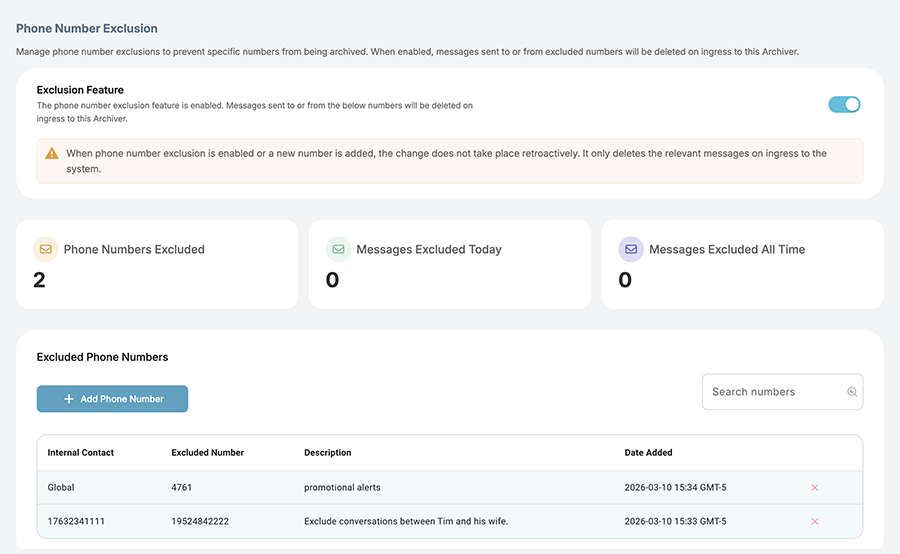
AOS 7.4 introduces the ability to exclude specific phone numbers from archiving — giving organizations precise control over which communications are stored. This feature allows compliance administrators to maintain full, legally defensible archives of all business-related text messages while honoring the privacy of personal communications.
The feature supports two distinct levels of exclusion, offering flexibility for different organizational needs:
How Exclusions Work
GLOBAL EXCLUSION — A phone number excluded globally is never archived, regardless of which employee or contact it is associated with. This is ideal for numbers that are categorically personal and will never have business relevance.
CONTACT-SPECIFIC EXCLUSION — A phone number can be excluded only when associated with a specific named contact. This provides finer control in situations where the same number might represent both a personal and business relationship depending on context.
Why This Matters: Practical Use Cases
The phone number exclusion feature addresses real scenarios that compliance teams, HR departments, and employees face every day:
- Family Communications — An employee can have their spouse’s or children’s numbers excluded from the archive, ensuring those personal conversations remain entirely private.
- Automated and Spam Messages — Exclude automated delivery notifications, promotional texts, or other noise that adds no compliance value and clutters the archive.
- Selective Personal Contact Management — For employees with close personal contacts who occasionally reach out on a work device, exclusions ensure professional and personal boundaries are respected.
- Storage Efficiency — Fewer irrelevant messages in the archive reduces storage costs and makes compliance searches faster and more meaningful.
Platform Availability
This feature is currently available for select partner environments that have implemented Intradyn’s third-party header requirements, which make granular exclusions technically possible. Support for additional partners will be announced as they adopt the required integration standard.
A Step Forward for Responsible Compliance
The introduction of phone number exclusions reflects Intradyn’s belief that compliance and privacy are not opposing values — they are complementary ones. A well-designed archiving solution should make it easier for organizations to do the right thing on both fronts.
With AOS 7.4, organizations no longer have to choose between maintaining regulatory compliance and respecting the personal lives of their employees. The two can coexist — thoughtfully, transparently, and with the right tools in place.
Redesigned SSL Certificate Management
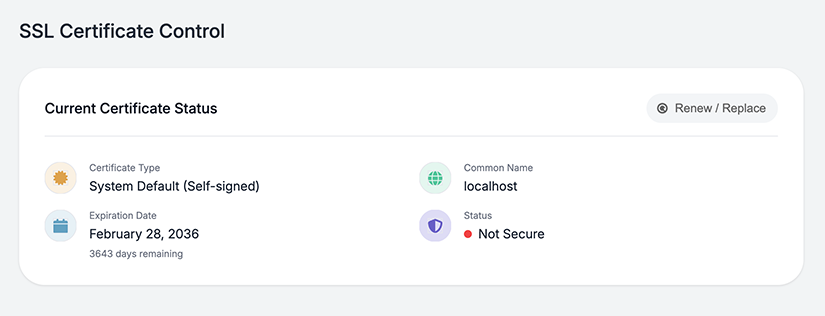
Managing SSL certificates has historically been one of the more technically demanding aspects of running the Intradyn Archiver. In AOS 7.4, we have completely rewritten the SSL certificate workflow from the ground up to make the process cleaner, more intuitive, and significantly more robust.
The redesigned interface guides administrators through certificate setup and renewal with greater clarity, reducing the likelihood of misconfiguration and minimizing disruption to archiving operations. Whether you are installing a new certificate, updating an expiring one, or managing certificates across multiple environments, the new workflow provides a more streamlined experience at every step.
Key Improvements in SSL Certificate Management
Fully rewritten certificate workflow with a cleaner, step-by-step interface
Improved error handling and validation to catch issues before they affect operations
More robust certificate installation and renewal process
Reduced complexity for administrators managing multiple environments
Redesigned In-Product Help Pages
Clear, accessible documentation is an essential part of any enterprise software experience. In AOS 7.4, the in-product help pages have been fully redesigned with a refreshed look and feel that makes it easier for administrators and users to find the guidance they need, when they need it.
The updated help pages feature improved navigation, more consistent formatting, and a visual design that aligns with the broader AOS interface. Whether you are onboarding a new team member or troubleshooting an unfamiliar setting, the redesigned help experience is designed to reduce friction and support confident use of the platform.
Help Page Enhancements
Fully redesigned layout with a refreshed visual design
Improved content structure for faster navigation
Consistent formatting aligned with the AOS interface
Better suited for both new users and experienced administrators
Improved Remote Support
AOS 7.4 introduces an improved way for Intradyn support teams to connect to your environment when you need assistance. The new method is more reliable and consistent, helping ensure that support sessions go smoothly and issues get resolved faster.
Improved Remote Support — What’s New
More reliable remote support connections for a smoother assistance experience
Simple access controls so administrators can quickly grant or revoke support access
Reduced back-and-forth during support engagements — fewer failed connections, faster resolutions
Works dependably across a wide range of network environments
For administrators who have experienced interrupted or unreliable support sessions in the past, this improvement makes a meaningful difference. When you need help, the connection just works — letting our team focus on solving your issue rather than troubleshooting access.
Upgrade Guidance
AOS 7.4 is available now for all Intradyn customers. Before upgrading, we recommend reviewing the following:
- Review your current SSL certificate configuration to take full advantage of the redesigned workflow.
- If you use text message archiving, coordinate with your administrator to identify phone numbers appropriate for global or contact-specific exclusion.
- No configuration changes are required for the help page updates or tunnel server improvements — these are available immediately upon upgrade.
- As always, we recommend scheduling upgrades during a low-activity window and ensuring your remote backup is current before proceeding.
If you have questions about the upgrade process, our support team is ready to assist.
What's Next
AOS 7.4 is an important step forward — but it is not the final one. Intradyn continues to invest in expanding phone number exclusion capabilities to additional platform partners, enhancing compliance intelligence across all archiving channels, and building tools that reflect the realities of how people communicate today.
We remain committed to delivering solutions that are not just compliant, but thoughtful — designed to protect both the organization and the individuals within it.
Thank you for being an Intradyn customer. Your trust in our platform is something we take seriously, and every release is an expression of that commitment.
Get in Touch
Whether you want to learn more about AOS 7.4, explore how phone number exclusions could work in your organization, or simply need help with your existing deployment, our team is here for you.
New Customers
Contact Sales
sales@intradyn.com
Existing Customers
Contact Support
support@intradyn.com